|
|
Installation
Installation was very simple for both UPS's. Basically install the UPS, plug in your components, hook the UPS up to your computer, and then install the software.
Software
Both the Belkin and the APC offer totally different types of software to manage your system. The software offered, I believe, is a very big determining factor on which product to choose. Let's take a look.
Belkin Sentry Bulldog Service
Included with the Belkin 650VA is the Belkin Sentry Bulldog management software. This software does pretty much everything you could dream and more.
Instead of just describing it, I will include some screenshots with references to descriptions of the various functions.
After installing the Sentry Bulldog software included with the Belkin 650VA, a tray icon appears in your system tray to provide quick access to the many features included in the software.
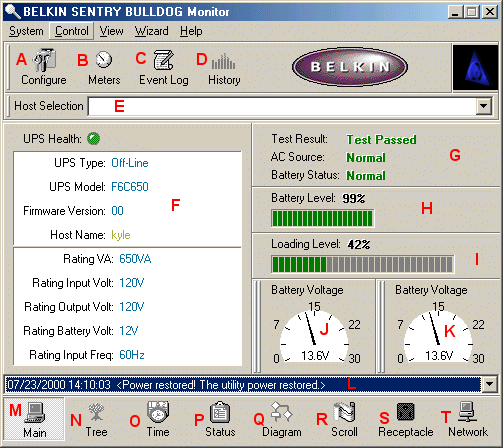
When you open the Bulldog software, it communicates via USB to your UPS to find out the current status of the UPS. You are then presented with details on it.
(A) Configuration allows you to configure your UPS for running scheduled events, automatic notifications via e-mail, pager, and network upon certain UPS conditions such as failure. Set Internet connection port for monitoring, SNMP info, and more.
(B) Displays various meters of current temperature, battery level, output load, output voltage, etc.
(C) Displays the event log, which logs UPS events.
(D) Displays history of such things as battery voltage, battery level, output voltage, temperature, etc., for the period specified.
(E) Allows you to select to monitor a local UPS or one that is on a network.
(F) Displays current stats about the health of the UPS.
(G) Communication test results as well as battery status and AC status.
(H) Displays the current battery level
(I) Displays the current load on the UPS
(J + K) Displays the current battery level - both can be changed to display different things.
(L) Recent Event Log displays the 10 most recent events
(M) Switches to the current displayed information
(N) Displays current information about the system and UPS as well as input and output in a tree format.
(O) Displays when the battery needs to be replaced, when the next scheduled tests, and restart are.
(P) Displays the current status of the UPS as well as what options are turned on like alarms
(Q) Displays a diagram of the battery voltage, level, as well as AC output, and input.
(R) Scrolls real time input and output voltage levels in a graph format.
(S) Displays the current receptacle status as well as its scheduled turn off time.
(T) Displays the status of setup UPS systems on the network.
|