|
|
Setup
Setup of the DI-701 is relatively painless. All I had to do was simply connect the Global Port on the DI-701 to my Cable Modem and connect the Local Port on the DI-701 to my NIC card. This allows it to sit in between my cable modem and computer to protect it.
Software
To configure the DI-701 you have several options, you can connect directly to it via the included Serial Cable and use HyperTerminal to establish a connection. You can also telnet into it or use the included GUI interface.
Let's take a closer look at the GUI interface.
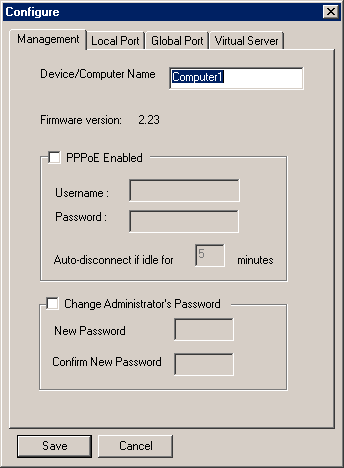
Opening up the configuration tool you can see there are several options to choose from. The first tab deals with manageability. Here you can enable PPPoE if your ISP requires you to log in, as well as set an Administrator Password, to provide security so that someone can't just telnet in and change your settings.
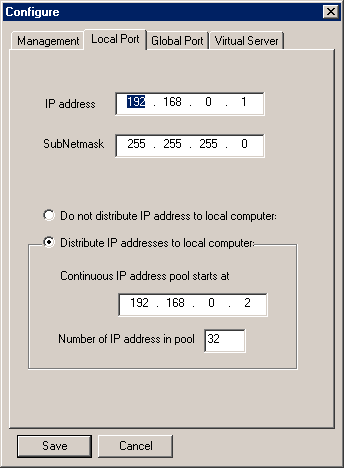
The Local Port property sheet allows you to set up the IP of the actual gateway, as well as the DHCP options for your local network. The DHCP can provide IP addresses for up to 128 clients.
|


