|
Testing
For testing I simply installed Lockdown
2000 and let it monitor any connection attempts. I then shared
out a few folders to see if the router blocked NETBIOS names as
it claims. After several weeks of use, not one person had connected
to any shares that I had available or connected at all to my computer.
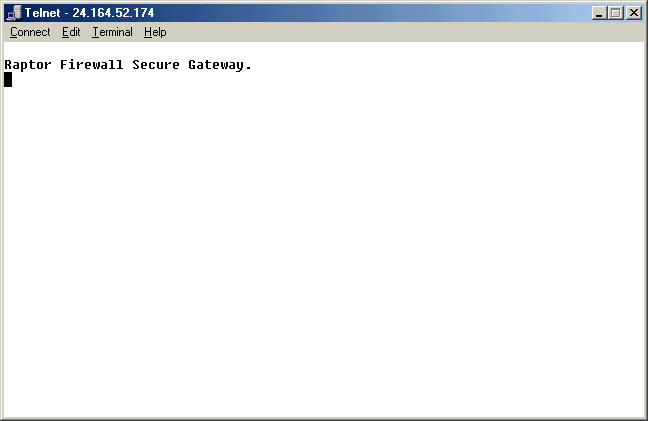
One interesting thing I found when trying to telnet into the router
from the Internet was that it came up with the Raptor Firewall Secure
Gateway.
Perhaps this is the same award winning Firewall
software from Axent Technologies?
Conclusion
Congratulations to NETGEAR on a great product. The RT314 performs
superbly. It provides an easy web-based setup for less experienced
users who just want to connect the router up and have it work in
as few steps as possible. For the more advanced user, it provides
great features like packet filtering, static routing as well as
the ability to have incoming ports redirected.
The only thing that could potentially be a problem to some users
could be the ability of only being able to configure 10 incoming
ports. It all depends on which applications you run. On my system
I ran the basic Internet applications like ICQ, AOL IM, and Counterstrike
without having to open any ports at all. If you do video conferencing
though, you will probably have to open up some ports. Just make
sure to find out which applications that you have require incoming
ports, and that will help you determine if the NETGEAR RT314 will
be right for you. For the average user, 10 ports should be more
then plenty and should not be a problem.
The integration of a 4-port switch is great, because it allows
for maximum utilization of your network bandwidth by segmenting
each computer that it is attached to, to the proper speed. For example,
if you have 4 computers; and 2 of them have 10Mb cards and the others
have 100Mb cards, unlike with a hub which would send at the slowest
speed connection on the network, a switch will provide a 10Mb transfer
speed to the 10Mb computers and a 100Mb transfer speed to the 2
100Mb computers, efficiently using your bandwidth.
I would highly recommend this to anyone that is looking to share
multiple computers on a single broadband connection or looking to
secure their network from the outside world.
|