| The Products
The Xtasy 6964 and Xtasy 6564 include the basic features seen on
the GeForce3. The big differences between the Xstasy 6964 and 6564
are the graphics processors and the core clock speeds of them. The
Xstasy 6964 also features a DVI port whereas the 6564 does not.
The Xstasy GeForce4 MX 440 is the GeForce4 version of the GeForce
MX400. It features dual monitor support, as did the MX400, as well
as featuring the latest GeForce4 GPU, providing support for the
latest games.
With the Xstasy GeForce4 Ti 4400 and Xstasy GeForce4 Ti 4600,
however, there is a whole new list of features made available by
the creation of the GeForce4 graphics processor. I am going to summarize
the basic technologies which are featured on these products
nfiniteFX II
This technology originally debuted with the GeForce 3. You may or
may not have heard or read of vertex and pixel shaders; but if so,
these are subcomponents which make up the nFiniteFX engine. Of course
with the GeForce4, however, these features have been improved providing
for more realism. The nFiniteFX II engine now features dual vertex
shaders and advanced pixel shaders, which in laymen's terms means
more realism to games. An example Nvidia gives on their website
is the Wolfman demo which features realistic hair created on the
beast that moves as it does. Something like this was unimaginable
with older cards.
For more detailed information on this topic, please check out http://www.nvidia.com/view.asp?IO=feature_nfinitefxii
LMA II
Also debuting originally with the GeForce 3 is Lightspeed Memory
Architecture which, in brief, eliminates the memory bottleneck seen
in older cards. Featuring better memory management and better data
throughput, this allows graphics to be loaded more quickly and handled
in a more efficient way.
For detailed information on the subcomponents of this feature please
check out http://www.nvidia.com/view.asp?IO=feature_lmaii
Accuview AA
This is a new antialiasing technology now available with the GeForce4.
I can remember not too long ago when 2x and 4x sampling were the
big thing, then came along Quincunx technology with the birth of
the Geforce3. Well, now with the GeForce4 we have 4xS or Accuview
AA which provides 50% more pixel coverage than prior technologies.
The 4xS technology also features antistropic filtering allowing
for even smoother precision when used with bilinear and trilinear
filtering.
Unfortunately, however, this feature is only available with Direct3D
applications.
For more detailed information, please check out http://www.nvidia.com/view.asp?IO=feature_accuview
nView
Linux users out there will get a kick out of this one. It seems
that Nvidia has decided to bring multiple desktops to Windows with
their new nView technology. This technology provides support for
multiple desktops both on a single monitor or multiple monitors.
It features enhanced multiple-monitor support, as well.
Some of the features include:
Desktop Management: Multiple desktop support allowing a user to
create and switch between up to 32 different desktops providing
for better multitasking. For those not familiar with this technology,
it allows you to have Microsoft Word open on one desktop and Microsoft
Outlook on another and easily switch between the two either via
the extensions menu or a hot-key that you can assign. It also features
advanced wallpaper support allowing each desktop to have a different
wallpaper. This technology integrates into several areas of windows,
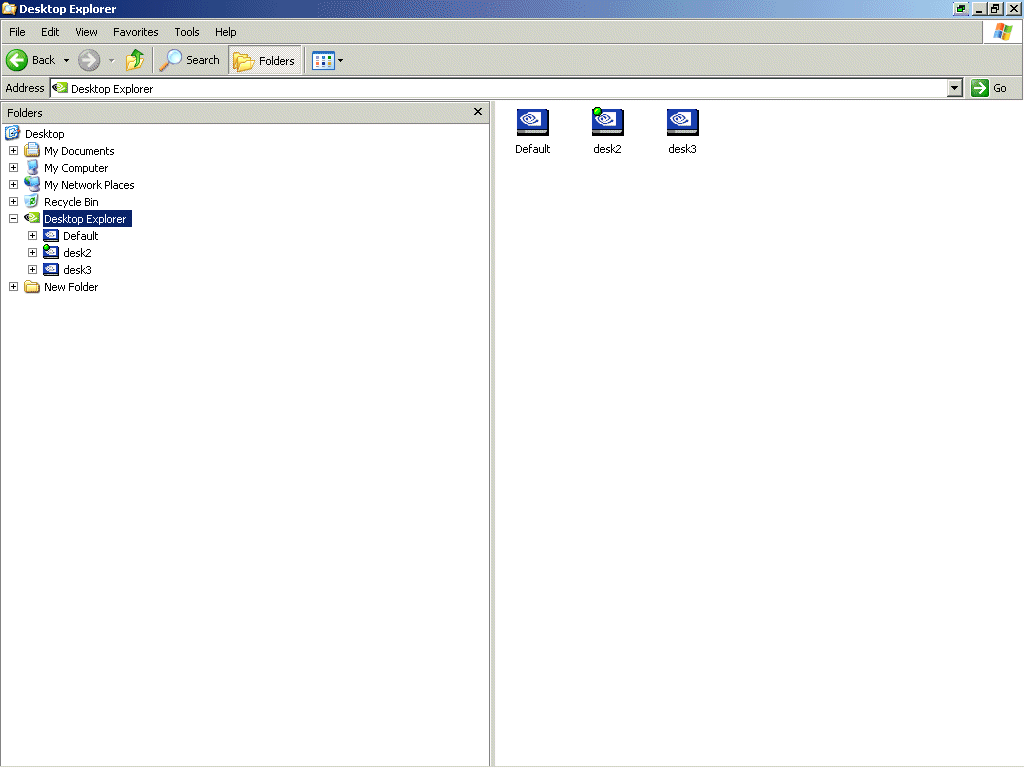
one being into Windows Explorer allowing access to various desktops
as though they were folders on a drive. Here are some examples to
give a better idea of what I am talking about

Accessing the Desktop Explorer via the icon on the desktop

Switching desktops via the menu extensions

Accessing desktops via Windows Explorer
Transparency Effects: This feature uses the advanced graphics
features supported by the Geforce4 to provide window transparency
when dragging a window allowing a user to see, for example, what
is behind an application by simply dragging it.

Zoom Features: These features are like windows built-in
zoom accessibility feature, however there is more features included
such as higher zoom and refresh rate control.

Hot Keys: This feature allows you to assign pretty much
all aspects of nView to hot key combinations. For example, you can
assign a hot key to easily switch between desktops or to easily
zoom in on something. (A screenshot of the applet is seen below)

All of the options for nView can be configured via the Control
Panel. Here is some screenshots of the configuration applet.


All settings are stored within profiles that can even be created
and customized to allow for multiple configurations. Something like
this would be good if it were being utilized in a work environment
This truly is a very nice feature. In fact I used it to do this
review, and it helped greatly by allowing me to easily switch between
the review and my image-editing program.
If you would like to view a complete list of video tutorials on
the features that nView has to offer, please check out http://www.nvidia.com/view.asp?IO=nview_tutorials
|


 E3: Electronic Entertainment Expo 2002