|
Software and Advanced Configuration Cont..
Remote Node Profile - This option allows you to configure
additional options for your Internet setup.
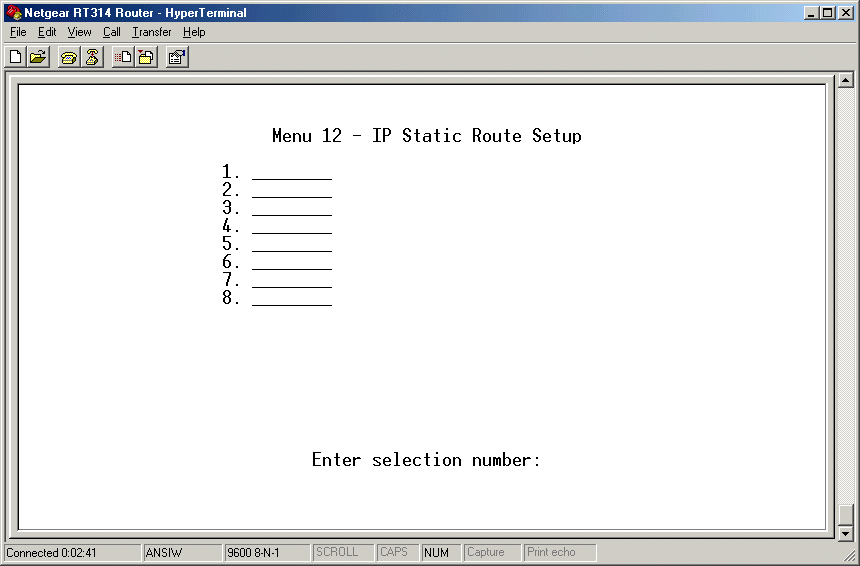
Static Routing Setup - This option allows you to specify
static routes for if you have maybe more than one router or have
different subnets. You can configure up to 8 static routes.
SUA Server Setup - This is a really nice options which allows
you to setup rules to route incoming packets to certain computers
on your network. If you, for example, have an FTP server running
on one of your local computers, you need to open up port 21 and
have it route all incoming packets at that port to the specified
server hosting the FTP. This option can be configured via the web-based
configuration. There are 10 configurable ports and the default port,
which routes all incoming packets on all ports to a specified computer.
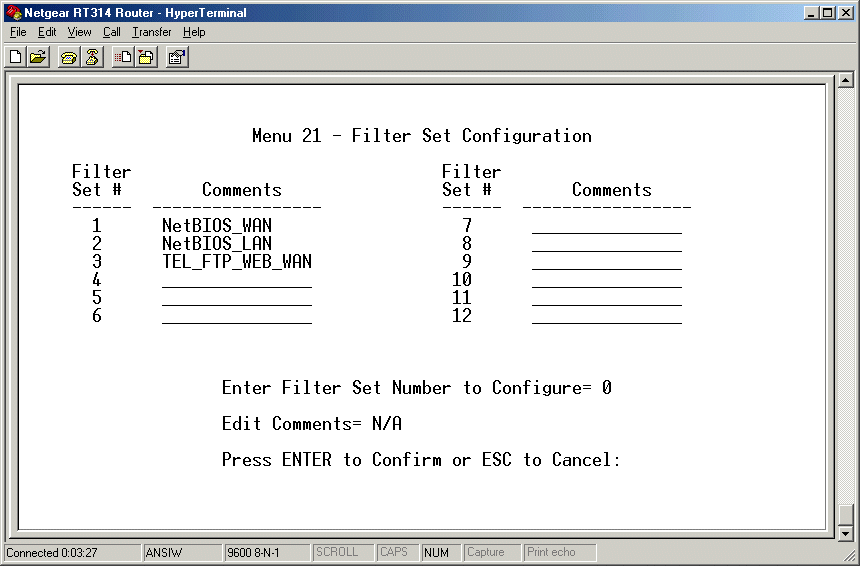
Filter Set Configuration - This option allows you to set
up filters for incoming packets. There are 12 configurable filters.
Each filter can have up to 6 rules. For example, if you would like
to ban a specified IP from ever getting passed your firewall, you
could do this here. The rules can be made up of checking the Source
Address, Destination Address, Source Port Number, Protocol, Offset,
and Length. You can select to either drop the packet, forward the
packet somewhere, or check the next rule in the list. After configuring
the filter you must specify how to use it back in the "LAN Setup"
menu option.
The default filters include blocking computers on the LAN from
sending NETBIOS names to the ISP, preventing computers on the LAN
from sending NETBIOS requests to the ISP's DNS, and preventing users
on the internet from connecting to the router to configure it via
telnet.
System Password - This option is pretty self-explanatory.
It allows you to change the password used to enter the router configuration
menu for both telnet and web-based configuration. I would recommend
changing this from the default of 1234 just for security reasons.
|