|
Software and Advanced Configuration Cont..
System Password - This option is pretty self-explanatory.
It allows you to change the password used to enter the router configuration
menu for both telnet and web-based configuration. I would recommend
changing this from the default of 1234 just for security reasons.
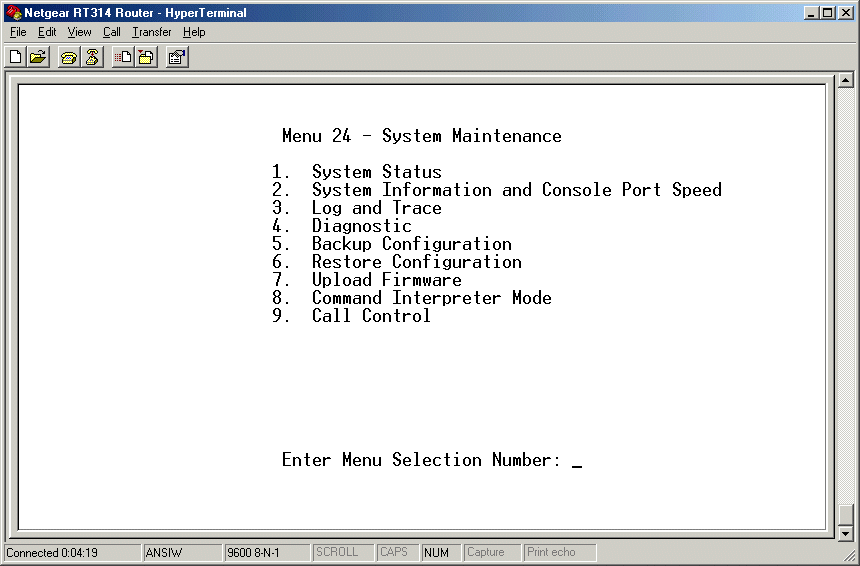
System Maintenance - This option when selected has menu
submenus as shown in the picture below.
System Status - Displays the current status of both the
LAN and WAN port.
System Information and Console Speed - Allows you to set
the speed to which you connect when using serial connection.
Log and Trace - Allows you to view the error log of the
router to troubleshoot problems as well as setup the option to forward
UNIX syslog's to a specified machine.
Diagnostic Menu - This allows you to troubleshoot problems
from the routers perspective by having the router ping a local or
Internet IP address as well as release and renew its WAN IP address.
This helps in troubleshooting problems. Backup,
Restore Configuration and Upload Firmware - These options
simply give you instructions for doing the specified actions.
Command Interpreter Mode - This option allows you to test
the router by executing scripts or configuring it by using built-in
commands. The built-in commands can be viewed here
|